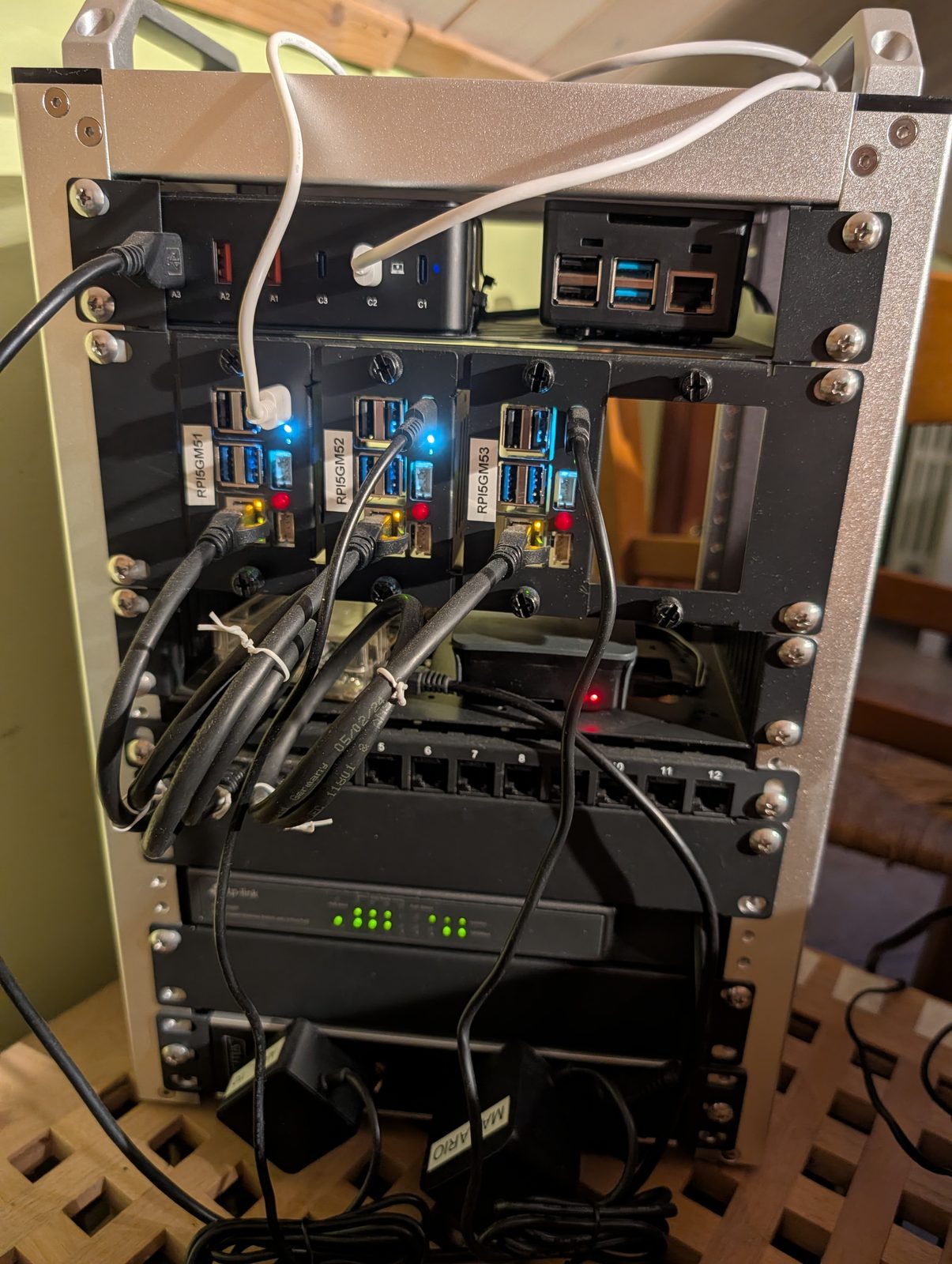
The actual rack: the three carrier trays in the middle are rpi5gm51, rpi5gm52
and rpi5gm53 (labelled left to right), each with its own Ethernet drop to the
PoE+ switch mounted below them. The hub above the nodes is unrelated USB/dock
hardware sharing the same enclosure.
I’ve been slowly rebuilding my home lab (gmhome) around a proper, reproducible
Ansible codebase instead of a pile of one-off SSH sessions. The centerpiece is
k3s-gmhome: a 3-node, highly-available k3s cluster running
on Raspberry Pi 5 hardware, brought up entirely from an Ansible playbook. Here’s
how it’s put together.
The hardware
Three Raspberry Pi 5 boards, deliberately not identical — I had the parts on hand rather than buying a matched set:
| Hostname | CPU | RAM | Storage |
|---|---|---|---|
| rpi5gm51 | Raspberry Pi 5 Model B Rev 1.0 | 4 GiB | 1 TB NVMe SSD |
| rpi5gm52 | Raspberry Pi 5 Model B Rev 1.0 | 8 GiB | 2 TB NVMe SSD |
| rpi5gm53 | Raspberry Pi 5 Model B Rev 1.1 | 16 GiB | 2 TB NVMe SSD |
Each node boots straight off NVMe (no microSD in the loop), gets its power from a shared multi-port GaN USB-C supply, and its network from a PoE+ switch. All of it lives in a small rack-mounted enclosure rather than a shelf of loose boards.
Why all-master, no workers
The cluster runs all three nodes as control-plane/etcd/master — there’s no
separate worker group yet. That’s a deliberate simplification: with only three
nodes, running them all as masters gives etcd quorum and spreads workloads
across all the capacity I have, without the added complexity of a fourth
role to manage. The inventory already has an empty k3s_gmhome_worker group
ready for whenever I add dedicated workers.
OS and network prep
Each Pi runs Ubuntu Server 24.04.3 LTS installed straight to NVMe via
rpi-imager’s network-boot installer, with SSH and locale/timezone
(Europe/Rome) set during imaging. After first boot, every node gets:
- Tailscale installed, for out-of-band access independent of the LAN.
- Passwordless
sudofor theubuntuuser, so Ansible can run privileged tasks without prompting.
The nodes talk to each other over a plain LAN subnet (192.168.7.0/24), not
over Tailscale — more on why below.
Ansible setup
The inventory groups the three Pis under k3s_gmhome_master:
[k3s_gmhome_master]
rpi5gm51    ansible_host=rpi5gm51.tailXXXXX.ts.net   ansible_user='ubuntu'
rpi5gm52    ansible_host=rpi5gm52.tailXXXXX.ts.net   ansible_user='ubuntu'
rpi5gm53    ansible_host=rpi5gm53.tailXXXXX.ts.net   ansible_user='ubuntu'

[k3s_gmhome_worker]
; (empty for now)

[k3s_gmhome:children]
k3s_gmhome_master
k3s_gmhome_worker
ansible_host actually points at each node’s Tailscale hostname — that’s just
how Ansible reaches the nodes over SSH from my dev container; it’s separate
from what the cluster itself uses internally (see below). Before touching k3s,
a few ad-hoc commands are enough to sanity-check the fleet:
ansible k3s_gmhome -a "date"
ansible k3s_gmhome -a "df -h" -f 1
ansible k3s_gmhome -m ansible.builtin.apt -a "upgrade=dist" -b
Keeping the join token out of Git with Ansible Vault
The k3s cluster join token is a shared secret, so it’s encrypted at rest with
Ansible Vault
rather than sitting in group_vars as plaintext:
k3s_token=$(uuidgen)
ansible-vault encrypt_string --name k3s_token "$k3s_token"
The output — an inline !vault block — gets pasted into
inventory/group_vars/k3s_gmhome.yml, and the vault password itself lives in a
local, gitignored vault-password.enc file (*.enc is excluded via
.gitignore), so a fresh clone always has to recreate it before the playbook
will run. Once the cluster exists, the same token can be read straight off any
master at /var/lib/rancher/k3s/server/token if it’s ever needed by hand.
The playbook
Rather than writing k3s bring-up logic from scratch, the playbook builds on
the community
techno_tim.k3s_ansible
collection (as covered in
Techno Tim’s k3s-etcd-ansible writeup),
which already encodes the fiddly parts of a highly-available k3s install.
playbooks/k3s_gmhome_install.yml just sequences its roles against the right
host groups:
- name: Prepare k3s nodes
  hosts: k3s_gmhome
  roles:
    - role: techno_tim.k3s_ansible.prereq
      become: true
    - role: techno_tim.k3s_ansible.download
      become: true
    - role: techno_tim.k3s_ansible.raspberrypi
      become: true

- name: Setup k3s servers
  hosts: k3s_gmhome_master
  roles:
    - role: techno_tim.k3s_ansible.k3s_server
      become: true

- name: Setup k3s agents
  hosts: k3s_gmhome_worker
  roles:
    - role: techno_tim.k3s_ansible.k3s_agent
      become: true

- name: Configure k3s cluster
  hosts: k3s_gmhome_master
  roles:
    - role: techno_tim.k3s_ansible.k3s_server_post
      become: true
None of this would have come together as quickly without Davide Macario, whose own internal writeup on the same topic was a huge source of inspiration for how I approached the whole bring-up.
All the actual tuning lives in inventory/group_vars/k3s_gmhome.yml, which is
a trimmed-down copy of the collection’s own sample vars file. The interesting
choices:
- kube-vip provides a virtual IP
(
192.168.7.15) for the control-plane API server, shared across all three masters via ARP — sokubectlkeeps working even if any single master goes down. - MetalLB, in Layer 2 mode, hands out
LoadBalancerservice IPs from192.168.7.20–192.168.7.29(kept outside the DHCP range on purpose). k3s’s built-inservicelband bundled Traefik are both explicitly disabled, since real MetalLB and a separately-managed Traefik take their place. - flannel is the CNI (the default for this collection); Calico and Cilium are supported alternatives in the same vars file but weren’t needed here.
A deliberate constraint: no Tailscale IPs inside the cluster
The cluster’s internal traffic and the kube-vip virtual IP both stay on the plain LAN, not on the tailnet. The reason is structural: there’s currently no way to allocate a virtual IP inside a tailnet for kube-vip to bind to, so routing the control-plane VIP over Tailscale would quietly break the HA setup it’s there to provide. It also means every node has to sit on the same LAN subnet — a real limitation, though the Tailscale Kubernetes Operator offers a way to expose specific services to the tailnet afterwards without touching that constraint.
Bringing it up
uv sync
ansible-galaxy install -r collections/requirements.yml
ansible-playbook playbooks/k3s_gmhome_install.yml
The one part worth expecting: the “verify that all nodes actually joined” task retries for a while before succeeding — normal on a first bring-up while etcd finds quorum across three fresh nodes, not a sign of failure. A few minutes later:
NAME       STATUS   ROLES                       AGE   VERSION
rpi5gm51   Ready    control-plane,etcd,master   54m   v1.33.5+k3s1
rpi5gm52   Ready    control-plane,etcd,master   54m   v1.33.5+k3s1
rpi5gm53   Ready    control-plane,etcd,master   54m   v1.33.5+k3s1
with CoreDNS, kube-vip, MetalLB, metrics-server and the local-path provisioner already running across all three nodes.
If something goes sideways instead, there’s a matching teardown playbook
(k3s_gmhome_teardown.yml) that resets every node back to a clean slate, and
journalctl --unit=k3s-init.service on the affected node is usually the
fastest way to see what k3s itself thinks went wrong before re-running the
install.
Two bugs a later review caught
A configuration review some months after the initial bring-up turned up two things worth mentioning, since neither was obvious just from a successful playbook run:
- Both the install and teardown playbooks referenced
vars_files: vars/k3s.yml— a file that had never actually been committed. Testing against the pinnedansible-coreversion confirmed a missingvars_filesentry is silently ignored rather than fatal, so this was dead, misleading configuration rather than a play-breaking bug. Removed, since every real variable already lives ininventory/group_vars/k3s_gmhome.yml. - The install playbook’s “Prepare k3s nodes” play listed the
techno_tim.k3s_ansible.raspberrypirole twice.ansible-playbook --list-tasksconfirmed its cgroup/linux-modules-extra-raspitasks were genuinely running twice per node. Removed the duplicate, matching the upstream collection’s own role ordering.
Both fixes were verified with --syntax-check and --list-tasks rather than
re-run against the live cluster, since neither one changes actual cluster
state — a good reminder that a playbook succeeding end-to-end doesn’t mean
every line in it is doing something meaningful.
What’s next
This covers just standing the cluster up. Ingress (Traefik), persistent storage (Longhorn), and monitoring (Grafana Cloud) are separate pieces layered on top afterward — maybe material for a follow-up post once they’ve settled.